The more I use the new Chrome browser... the more I feel scared... Google has always backed up Firefox.. and now secretly develops its browser (by hacking one of Firefox developer).
But what really scares me is the amount of information that Google has at its disposal currently. I have always had issues with Google keeping an eye on my browsing, for me thats serious breach of privacy... I know EULA is something I accepted but.. this could be dangerous...Now we dont have google toolbar, but the browser records everything and anything according to EULA... Damn it...
With this kind of information and some backdoor business moves.. dunno how much of "Do no Evil" still stands true... Another microsoft in the making....
Saturday, September 06, 2008

Wednesday, September 03, 2008
Chrom(e)atic Browsing
I just downloaded the New browser from the Google stable - Chrome. Being a Firefox loyalist for 3 years now, I generally keep looking out for a reason to give up the loyalty but extensions just keep me hooked. But the first look of chrome, I got to say, I'm really impressed. With whatever time I played with it.. these are some of the really user friendly features:
- Dynamically moving tabs: The tabs can be dynamically moved on the taskbar. Although this has been a feature on Firefox for long, The visual impact is more in chrome.
- Speed of site rendering: The moment I opened a URL it appeared in no time at all... like in a flash. I dunno how they have achieved this, but I was amazed
- Task manager for crash control - In case your tab freezes or hangs up on you, the browser wont be affected as each tab is independent of the other in Chrome. Just right click and you have a "task manager" for browser... Beat that. Perhaps thats how they get the maximum speed of page rendering as each tab works independently. Wo ho..

- History on blank tabs and all the recently opened and closed tabs withing the browser window (Some like me, would call that a breach of privacy)


Google recently stopped the Browser Sync extension on Firefox - where users could have copy of their bookmarks and browser settings on Google servers .. I wonder if Chrome has anything to do with it. Hmmmm...
Anyways download your copy of Chrome and learn more.... I'll keep updating with new discoveries or enhancements in near future
- Dynamically moving tabs: The tabs can be dynamically moved on the taskbar. Although this has been a feature on Firefox for long, The visual impact is more in chrome.
- Speed of site rendering: The moment I opened a URL it appeared in no time at all... like in a flash. I dunno how they have achieved this, but I was amazed
- Task manager for crash control - In case your tab freezes or hangs up on you, the browser wont be affected as each tab is independent of the other in Chrome. Just right click and you have a "task manager" for browser... Beat that. Perhaps thats how they get the maximum speed of page rendering as each tab works independently. Wo ho..

- History on blank tabs and all the recently opened and closed tabs withing the browser window (Some like me, would call that a breach of privacy)

- Suggest feature in the URL bar: Just when you are typing, Google suggests the URLs popular or date and other relevant Keywords. Something we saw in the new Version of the Opera Browser.

- Instant bookmarking - just press the star button and you are done.
- No sharing info mode: Something that Google calls the "Incognito Mode" where the page would work in the same way but nothing from the session would be stored by Chrome. (I take back the breach of privacy statement :))
- No sharing info mode: Something that Google calls the "Incognito Mode" where the page would work in the same way but nothing from the session would be stored by Chrome. (I take back the breach of privacy statement :))
- Other standard features like - Phishing control, safe browsing, instant download bar (no extra download window- just icon at bottom)
Google recently stopped the Browser Sync extension on Firefox - where users could have copy of their bookmarks and browser settings on Google servers .. I wonder if Chrome has anything to do with it. Hmmmm...
Anyways download your copy of Chrome and learn more.... I'll keep updating with new discoveries or enhancements in near future
Sunday, November 04, 2007
3 Smart phone shootout
Since my friend was looking for a smart phone and I sent him my views.. I thought I might just post some reviews on the blog.. These are three phones which have basic and advanced smart phone features.. all targeted towards different audience... I just came across these three phones recently so.. there we are lemme tell you a litlle bit about it in the time i got to use them...
Motorokr (Multimedia entertainment kinda phone)
Features:
Premium entertainment PDA
• 2-megapixel CMOS camera with 8x digital zoom
• QVGA video capture for up to five hours
• Integrated MP3 player with dedicated music keys and built-in FM radio
• PDA featuring Business Card Reader, POP3 e-mail¹, document viewer to view Microsoft Word, Excel, etc., PIM
• Connectivity includes integrated stereo Bluetooth® wireless technology³, HTML browser, hi-speed USB 2.0 EMU, 3.5 millimeter stereo jack
• Removable memory card slot, up to 2GB full SD card support;

What I like: There are 2 versions available one with the bloototh headset and one without it with difference of 2000 Rs between them.. but go for the one with headset.. Also there one without the touch screen (PDA)
Best music phone from Moto.. great interfaces and camera as well as music.. slim and sleek.. so not to heavy in our pockets... still manages to be a manly one.. not sissy slim
Possible Downside: No EDGe and no Wi Fi... for a PDA type phone Wi fi is must...Since it promises to be a decent business phone as well.
Price: 15000
Nokia 6300 (simple middle of both segments phone)
I know it may not be fit for smart phone as per the latest definition.. But simplicity still rules for me
Features:
# attractive yet conservative design
# 2 megapixel camera
# microSD memory card slot
# FM radio
# standard miniUSB connector
# 2.5 mm audio jack
# Bluetooth with A2DP profile support

Possible Downside:
Could be that we do not like slim ones in our hand (atleast I don't) may be considered sissy by some..
Also unsatisfactory camera performance, videos taken at QCIF (176 x 144 pixels) resolution only, side keys are difficult to press, no Infrared port
Bottomline
Not the best smart phone in the market.. but its like thge best non-jazzy no-nonsense phone with the basic features built in and light... Its for you and me and people like us who want their phones to be phones and cameras to be separate and music players to be separately that...
PRICE: 10000-11000
HTC touch (Business Phone and more)
Features: PDA, has everything that a phone can have. Business phone like -Windoes IE, Outlook, MSN Instant Messenger, Windows Live, Windows Media Player 10, Solitaire, Bubble Breaker (game), Voice Recorder as well as handwriting recognition and MS' standard on-screen keyboard...blah blah.. has wi fi connectivity which is great and also the camera is not too bad either. Abhi I asked in market theres another less costly version (at about 14 K) available

What I like:
Light and small... also multimedia playback is very good through the included wired stereo headset and through stereo Bluetooth headphones. Very good battery life by Windows Mobile Professional standards. Bluetooth 2.0 and WiFi
Possible Downside:
I'm not a touch screen person so I find it cumbersome...
Windows tend to be sluggish and unresponsive like on our desktops. Touch interface doesn't extend far, no 3G, have to remove battery cover to access the MicroSD card slot.
PRICE: 20,000 (wo ho.. thats something)
Motorokr (Multimedia entertainment kinda phone)
Features:
Premium entertainment PDA
• 2-megapixel CMOS camera with 8x digital zoom
• QVGA video capture for up to five hours
• Integrated MP3 player with dedicated music keys and built-in FM radio
• PDA featuring Business Card Reader, POP3 e-mail¹, document viewer to view Microsoft Word, Excel, etc., PIM
• Connectivity includes integrated stereo Bluetooth® wireless technology³, HTML browser, hi-speed USB 2.0 EMU, 3.5 millimeter stereo jack
• Removable memory card slot, up to 2GB full SD card support;

What I like: There are 2 versions available one with the bloototh headset and one without it with difference of 2000 Rs between them.. but go for the one with headset.. Also there one without the touch screen (PDA)
Best music phone from Moto.. great interfaces and camera as well as music.. slim and sleek.. so not to heavy in our pockets... still manages to be a manly one.. not sissy slim
Possible Downside: No EDGe and no Wi Fi... for a PDA type phone Wi fi is must...Since it promises to be a decent business phone as well.
Price: 15000
Nokia 6300 (simple middle of both segments phone)
I know it may not be fit for smart phone as per the latest definition.. But simplicity still rules for me
Features:
# attractive yet conservative design
# 2 megapixel camera
# microSD memory card slot
# FM radio
# standard miniUSB connector
# 2.5 mm audio jack
# Bluetooth with A2DP profile support

Possible Downside:
Could be that we do not like slim ones in our hand (atleast I don't) may be considered sissy by some..
Also unsatisfactory camera performance, videos taken at QCIF (176 x 144 pixels) resolution only, side keys are difficult to press, no Infrared port
Bottomline
Not the best smart phone in the market.. but its like thge best non-jazzy no-nonsense phone with the basic features built in and light... Its for you and me and people like us who want their phones to be phones and cameras to be separate and music players to be separately that...
PRICE: 10000-11000
HTC touch (Business Phone and more)
Features: PDA, has everything that a phone can have. Business phone like -Windoes IE, Outlook, MSN Instant Messenger, Windows Live, Windows Media Player 10, Solitaire, Bubble Breaker (game), Voice Recorder as well as handwriting recognition and MS' standard on-screen keyboard...blah blah.. has wi fi connectivity which is great and also the camera is not too bad either. Abhi I asked in market theres another less costly version (at about 14 K) available

What I like:
Light and small... also multimedia playback is very good through the included wired stereo headset and through stereo Bluetooth headphones. Very good battery life by Windows Mobile Professional standards. Bluetooth 2.0 and WiFi
Possible Downside:
I'm not a touch screen person so I find it cumbersome...
Windows tend to be sluggish and unresponsive like on our desktops. Touch interface doesn't extend far, no 3G, have to remove battery cover to access the MicroSD card slot.
PRICE: 20,000 (wo ho.. thats something)
Saturday, November 03, 2007
Thought for lunch
Just something I made up
Working in office is like a Tennis match: until the score is love all.. all love you.... When its not, they try and throw the ball in your court. :)
Working in office is like a Tennis match: until the score is love all.. all love you.... When its not, they try and throw the ball in your court. :)
Tuesday, August 07, 2007
PR.. Is it update time?
It seems that the Google PR update is going on. We have been noticing the dropping and updating of some website’s page ranks in the last couple of days. Also the number of backlinks have been showing a change on different data centers from the last week of July.
These are signs of an update. My guess is that Page rank is being updated by google and well there’s no rocket science there as it was expected to be around this time.. 
Check out some tools to help the cause:
http://www.pageranktool.net/
http://www.mcdar.net/q-check/datatool.asp
Sunday, April 08, 2007
Tabs with Special effects.. Jazz it up
I came across this really cool extension with firefox which adds some special when we switch from one tab to the other within a firefox window.
Its more of an eye candy really than being a useful one.. But sometime an eye candy is what you need if you are sitting in front of the browser all day long.. (and even nights).... This would be great for people who love the rotating thumbnail view in Linux Fedora Core 6 (an old feature in this OS) and the hyped (actually a damp squib) Windows Vista....

Check this extension Tab Effect and enjoy the effective browsing
Its more of an eye candy really than being a useful one.. But sometime an eye candy is what you need if you are sitting in front of the browser all day long.. (and even nights).... This would be great for people who love the rotating thumbnail view in Linux Fedora Core 6 (an old feature in this OS) and the hyped (actually a damp squib) Windows Vista....

Check this extension Tab Effect and enjoy the effective browsing
Thursday, April 05, 2007
PR update happening in April 2007?
I have been noticing the dropping and updating of some website's page ranks in the last week. Also the number of backlinks have been showing a change on different data centers from the last week of March. These are signs of an update. My guess is that Page rank is being updated by google and its according to the anticipated date by a lot of people. April's the month for changes I guess..
So after the Jan update, the signs are of an April PR update.. which might stabilize over the next two weeks... Keep an Eye
For those wondering what a Google PR is, Read this
So after the Jan update, the signs are of an April PR update.. which might stabilize over the next two weeks... Keep an Eye
For those wondering what a Google PR is, Read this
Monday, April 02, 2007
Matt Cutts cut to size.. Hacked or Fooled

Google's most "Vocal" engineer and contributer to the algorithms Matt Cutts' blog has been hacked by the Dark SEO team, the self professed "Jehadis" of Search Engines
Have a look http://www.mattcutts.com/blog/
But hey is that an April Fool piece like google's tradition of april fool jokes?? (like TiSP and Google paper in 2007) .. I wonder
http://en.wikipedia.org/wiki/Google's_hoaxes
Thursday, March 15, 2007
Messy thought for food
They call my desk the messiest area of the office.... read this and say what..
If a cluttered desk signs a cluttered mind, of what, then, is an empty desk a sign?
If a cluttered desk signs a cluttered mind, of what, then, is an empty desk a sign?
Saturday, October 28, 2006
Firefox 2.0 out in the open - Review time
Well Firefox 2.0 is out and its review time over a cuppa cofee
Its more robust looking and yet sleeker.. Its supposed to be more secure and enhanced.. Firefox calls it Phishing Protection where they compare their existing list of reported phishing sites (who lure you into giving sensitive personal information) which may be a great thing but since security is not “visible” so cant really comment on that. But the security console seems pretty neat with anti phishing sites option

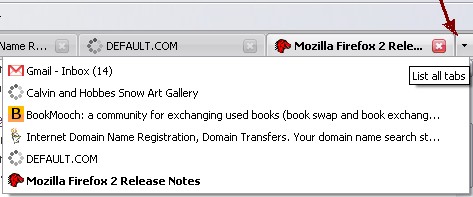
The tabs are better looking and has got a close button right on the tab (like tab mix plus extension and of course Opera) Also for people who work with large number of tabs in the same window, there are arrows on the left and right side of the tab strip that let them scroll back and forth between their tabs... Also It has recently closed tab button in the history.. But why would anyone use history option... It would have made more sense if this was a button right on the tab bar

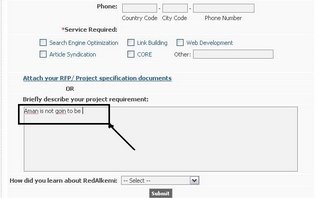
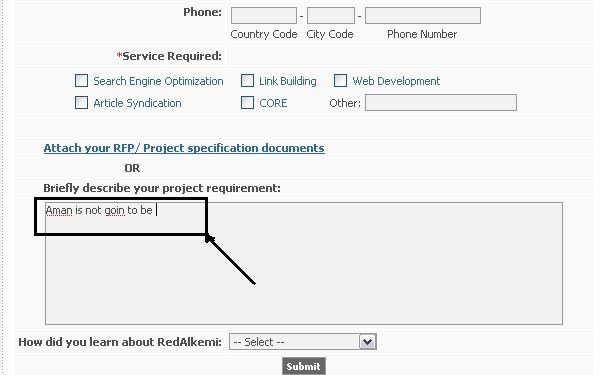
It has a inline spell checker in case you are filling some form which is a good feature
Right now the extensions are not compatible with the new version (and understandably so).. it was a little empty feeling for me.. I guess the extensions should also have been updated ...
One good feature is that the search boxes at top right are visually more appealing A new search engine manager makes it easier to add, remove and re-order search engines. It also comes with an awesome suggestion feature.. you type in a letter and its hows suggested words (ala Google suggest) along with you search history keywords which is a welsome step towards usability
Is it faster than the last version?... I don't think so... Opera is still much faster as far as page load time is concerned.. Firefox 1.5.0.7 was as fast as this one so no real additions here
Another thing that I noticed, As soon as I open Gmail or yahoo mail (any secure page) it me the authentication information like “authenticated by”. Well i don't know how useful that would be


Bottomline
It looks sleeker and a little enhanced in security but overall no striking change in usability or an outright enhancement. So a little bit of disappointment and kinda damp squib this release..
So looking forward to next version 3.0 code-named "Gran Paradiso”
PS: I'm still a firefox loyalist thought :-) thats why I'm more disappointed
Chai with Opera
Opera India is organizing an informal discussion session in Chandigarh. Its going to be discussing practical issues/ problems/ tips regarding web technologies. Its for everyone involved with the web whether you are a developer, designer or an avid Internet user or enthusiast, you can be a part of the meetup. You can find the details at - my.opera.com/operaindia
I think it'll be great for every Internet enthusiast around chandigarh to join in voice in your opinion.. I'm surely going to do just that..
Date: 29 October
Time: 11 AM (IST)
Venue: The Piccadily, Sector 22B Chandigarh
See ya there
I think it'll be great for every Internet enthusiast around chandigarh to join in voice in your opinion.. I'm surely going to do just that..
Date: 29 October
Time: 11 AM (IST)
Venue: The Piccadily, Sector 22B Chandigarh
See ya there
Sunday, October 22, 2006
Hooked on to Opera
Well... my friend insisted that I use Opera after seeing my blog full of Firefox Extensions. I did just that.. though most of the stuff is heard of and is similar to the extensions... but hey its sleeker and all features like "session manager" CSS viewers and quick note come as a "Standard Fitment" in Opera. They started the Tabbed Browsing concept anyways..
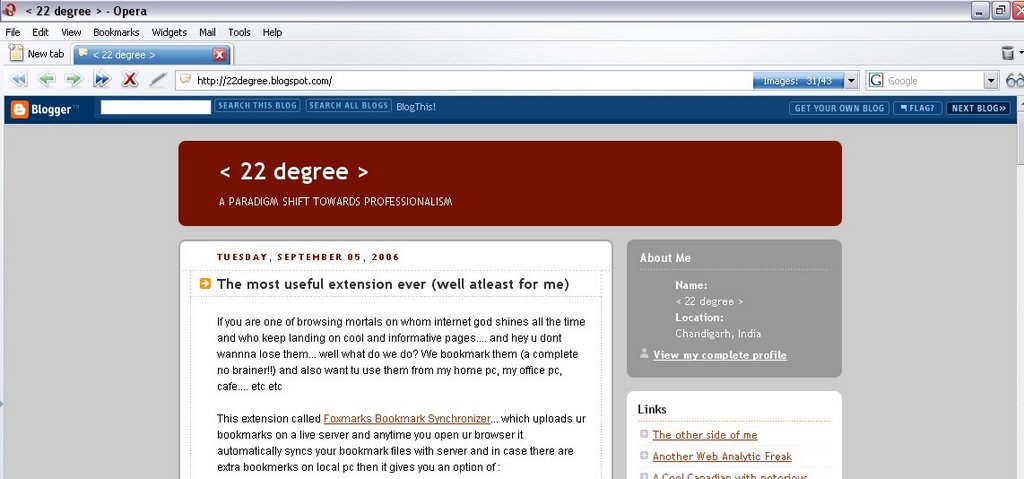
All I'll say is I'm mighty impressed.. Its the most user friendly browsers of them all. The popularity is amazing as Opera became FREE just an year ago. I'm so hooked on to mouse gestures that it seems that I cant use browsers without it. I think opera has also done a "Usability Study" for browsers coz only then would some body take care of small details like a recycle bin for accidentally closed tabs or Email client configuration within browser (the cherry on the cake) and having prefilled values for all popular POP mail services.
These are the things that an everyday user would crave for while using any kind of service or softwares or applications... One does need to get used to the Keyboard Shortcuts.. since u are using different ones in Firefox.. But from features like the "real" mouse gestures (not a fad extension), inbuilt mail client to drag and drop features to Trash Can.. thumbnail view of tabs without opening them... all is great about the browser.
The only thing that I didnt quite like are the Widgets.. they are just so bugging.. opening new windows if I enable them.. they are almost like parallel applications.. so not "opera"like... a real pain in the @&*
Being a Firefox loyalist I miss some of the extensions and maybe I have got used to it.. But I think if Opera incorporate some kinda extensions in Opera.. that would pack a KILLER punch for all of em.... Currently I would call Opera the most user friendly browser..
Just download it and get going
Cheers!!
Tuesday, September 05, 2006
The most useful extension ever (well atleast for me)
If you are one of browsing mortals on whom internet god shines all the time and who keep landing on cool and informative pages.... and hey u dont wannna lose them... well what do we do? We bookmark them (a complete no brainer!!) and also want tu use them from my home pc, my office pc, cafe.... etc etc
This extension called Foxmarks Bookmark Synchronizer... which uploads ur bookmarks on a live server and anytime you open ur browser it automatically syncs your bookmark files with server and in case there are extra bookmerks on local pc then it gives you an option of :
I found it simpler and more user friendly than the Google browser sync.. well people would beg to differ...
But theres only one way to find out... Just download it and temme...
Cheers!!
This extension called Foxmarks Bookmark Synchronizer... which uploads ur bookmarks on a live server and anytime you open ur browser it automatically syncs your bookmark files with server and in case there are extra bookmerks on local pc then it gives you an option of :
- Keeping the local ones
- Overwite with the server saved ones
- OR keep both!! (5 stars for usability)
I found it simpler and more user friendly than the Google browser sync.. well people would beg to differ...
But theres only one way to find out... Just download it and temme...
Cheers!!
Wednesday, August 02, 2006
Check out Google Checkout [wow thats sounding rhyming]
Well theres been a lot of talk about Google checkout that it'll check mate Papal and and shopping carts n all.... So I thought let me dive in and test the waters myself....
I ain't no expert on payment platforms anyways but since I have donned that Hat.. so what the heck..
Anyways its a neat move by google to capture shopping markets. Paypal now got a big rival one that doesnt really have nothing to loose (well maybe some reputation), but for me google has more change to succed and climb higher than paypal becuase of their investment on this type of systems. Google has alot of money to spend and he is not afraid to do that.


Anyways I thought the best way to write about it is with analysis kinda thingie since I'm a marketing/ web Business analyst :-]
Info/ Pros
One angle is that- All big stores will make themselves compliant for sure then why miss out. Also, The simple “Buy Now” button can be used by pasting simple HTML on the site Where we dont need shopping carts But...
Google checkout has a long way to go. Right now there are too many doubts. If Google can match paypal and better it, then bang on they deserve to overthrow the current standard of Payment Checkout, and I've no doubt they will. Though it sounds much user friendly and supposedly much “safer”, right now I would actually wait a couple of months to take a call on it before referring it to anyone
I ain't no expert on payment platforms anyways but since I have donned that Hat.. so what the heck..
Anyways its a neat move by google to capture shopping markets. Paypal now got a big rival one that doesnt really have nothing to loose (well maybe some reputation), but for me google has more change to succed and climb higher than paypal becuase of their investment on this type of systems. Google has alot of money to spend and he is not afraid to do that.


Anyways I thought the best way to write about it is with analysis kinda thingie since I'm a marketing/ web Business analyst :-]
Info/ Pros
- Google checkout seems to be just like paypal, they had said they will use his platform as a base for their program. Its just that if you have checked in once, then its more user friendly and less forms. This calls for better usability which is their USP.
- So far, it looks like this: Your uses add items to your cart and when they are ready to check out, they are taken to google to fill out their credit card info.
- I'm wondering if google has a way to register with google checkout on your own site and process it all server-to-server (php curl, specifically), like my current method of processing credit cards (authorize.net).
- For those who don't have any shopping cart, you can integrate with Google Checkout using “Buy Now” buttons. Simply add our HTML code to your website to display these buttons near the products you're selling. Buyers who click these buttons will be brought to a secure Google Checkout page where they can complete their purchase.
- Problem with paypal was that we need to have analytics to track sales and conversions based on payment methods. Using checkout and our adwords account we could track what keywords=google checkout conversions
If you spend enough on adwords then we could get almost all of our google checkout revenue processed for free. Thats a big incentive compared to paying 2-3% for major credit cards. 3% on $300k is a nice handful of money that would end up in our pockets - Google Checkout has been designed to simplify and streamline business-to-consumer e-commerce transactions by letting buyers store their purchasing information with Google. That way, users can store contact details, payment preferences and shipping information once, instead of having to enter that information separately with multiple merchants.
- For the first time a google product came without a beta version. Thats scary enough for my money to be thrown into an un-tested payment system.
- On another point, Google Checkout is pretty bad at this time. They do not support any realtime shipping rates, no shipping API rates, no coupons, no gift certificates, nor any tax rates you have setup in your regular e-commerce platform.
- The problem with implementing Google Checkout on a complex site is meshing their API with your site (only if you want a shopping cart). For instance, the buyer is checking out with Google Checkout and changes the shipping address to a new address. Your site has to get the new address from Google checkout, query UPS (if that's how you get your shipping charges) for updated shipping charges, update the cart on your site, then send the new cart data back to Google checkout - all on the fly. Think that's easy? no!
- A simple “buy now” button can be incorporated by using the simple cut and paste HTML on every product page and but telling the customer that they can buy only a single product using with Google checkout would sound stupid if we are a multiple product ecommerce site.
- Among the problems already mentioned with integrating it with your existing cart software, it doesn't handle phone orders. If you have a significant percentage of shoppers who will not enter any info online and prefer to call in an order, then there is no way.
One angle is that- All big stores will make themselves compliant for sure then why miss out. Also, The simple “Buy Now” button can be used by pasting simple HTML on the site Where we dont need shopping carts But...
Google checkout has a long way to go. Right now there are too many doubts. If Google can match paypal and better it, then bang on they deserve to overthrow the current standard of Payment Checkout, and I've no doubt they will. Though it sounds much user friendly and supposedly much “safer”, right now I would actually wait a couple of months to take a call on it before referring it to anyone
Wednesday, July 26, 2006
Click frauds- Does google really care
If you think that Google is sweating it out to avoid click frauds.... Think again..
Watch the video and let the video do the talking..
Watch the video and let the video do the talking..
Subscribe to:
Posts (Atom)