


Sunday, April 16, 2006

Wish we had these.....

Wish we had these cool enhancements in office :-)


Digital Bible!!… Holy $@&%

Would you like to carry the Holy Bible in your pocket? I think some people already do….. :-)

I couldn’t believe my eyes when I came across this remarkable USB Holy Bible.

The complete Bible is contained in a fixed memory test file format that you can easily access through your computer or laptop's USB port. Small enough to put on your key chain, the USB Holy Bible has a highly detailed leather look with gold lettering to make it an attractive and meaningful piece to carry with you.


It plugs into any Windows PC USB port (not Mac or Windows 98 compatible) and displays all 66 books of the Bible on your computer screen. There's even a search function, making this a unique gift or keepsake.

The digital bible costs $29.95 (£17.19) (wo ho… they say prayers are priceless)

I think a lot of eyebrows might be raised by the religious fanatics (but isnt’t that their job :-))

Who said Technology has no religion … huh

Wednesday, March 15, 2006

No longer temporary guys..... Looking back


My notepad… pencils and a cuppa coffee (I love the mug with RA inscription) and excel sheets (not shown :-)) are my best friends in office.

I’ve completed six months at RedAlkemi on 12th march (incidentally Pawan’s birthday too)….. I’m a RedAlkemi graduate now…...Alright!!! Hooray


Realkemi has given me a great start to my career… the best part was to start your working life with friends and that too friends like Amandeep.... (I don’t know if I can thank you enough Sandhu).... And Pancham actually polished me to some extent.. and gave me someone I can look up to and say.. that’s how we should do it…

Well guys I getting a little emotional now… I guess

But a great time nonetheless.. And Cheers to even better time ahead….

I have to say this yar

“Life mein maza a gaya yar… (Pancham’s influence)
Bharat mat ki jai…. ki jai…… ki jai”
Monday, March 13, 2006

CSS viewer for firefox

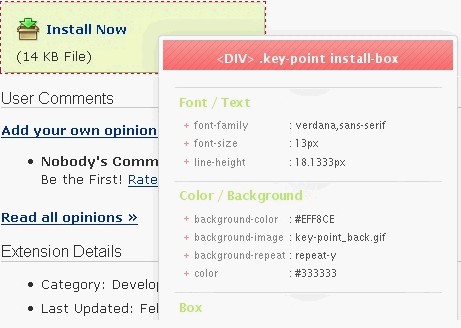
Another good tool for testers. This CSS viewer extension for firefox displays the CSS information for the elements of that webpage. Just move your mouse over the content and images a CSS display box shows all information


You can download the extension at CSS viewer

Wednesday, March 08, 2006

Tab Mix Extension for firefox

Are you one of those so used to tabbed browsing courtesy firefox (I am!!). And If the browser crashes on you while you were in the middle of a research on your assignment with the deadline for that very day -Fucked!! I have a solution to that.... (I'm almost sounding like a firefox
salesman right now :-0)


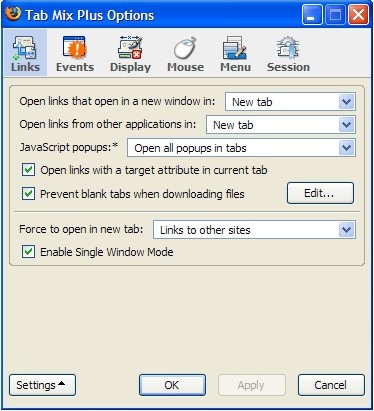
This extension Tab Mix Plus enhances tabbed browsing capabilities like tab focus, duplication...... bla blah ...... The best feature according to me is the Session Manager with crash recovery that can save and restore combinations of opened tabs and windows (Koolio)

Just check it out HERE

Extensions Galore..... One for Programmers


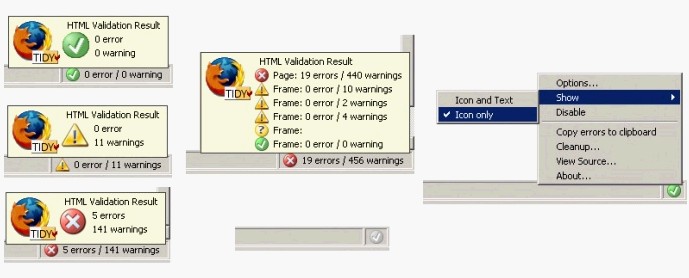
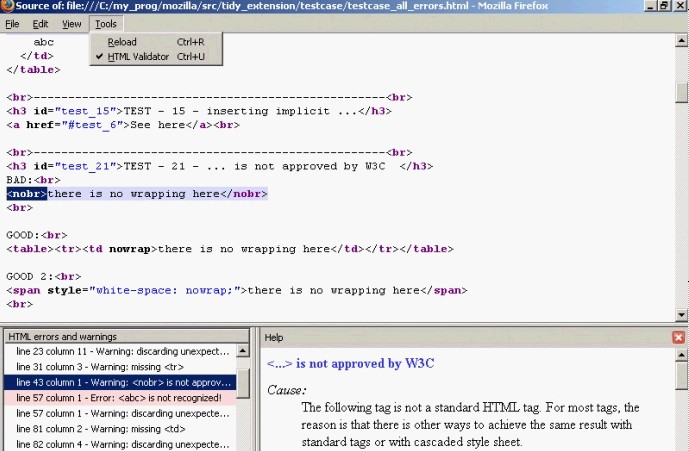
This extension by firefox makes developers and programmers life so much easier. They can check for their HTML code and debug it there and then.

Since I keep working with programmers all the time, I have to admit this is one of the most useful firefox extension in a long time. I got hold of it a little later in the day though (It was released in February 2006) but then as long as it still works for me :-)

Simply click the following link to download it and get going HTML Validator
Sunday, March 05, 2006

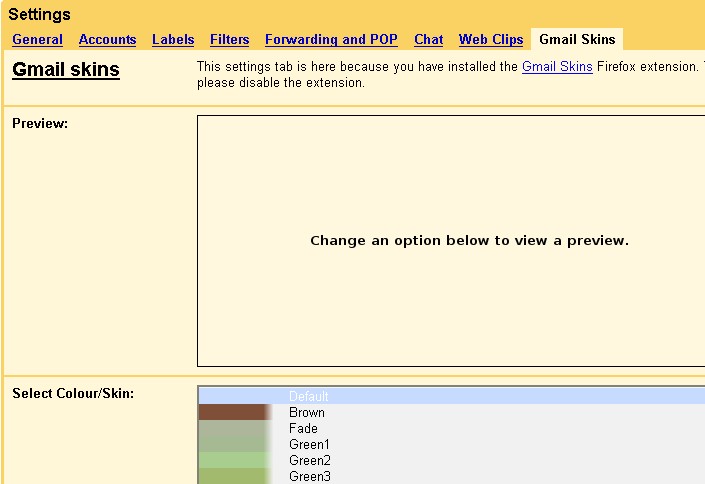
Gmail skins for firefox

For all you gmail lovers…. This Firefox extension will make your gmail life more jazzy than before.


It adds the following features:

· Change the colour/skin of your inbox (I’m not too sure you wannna do that)

· Insert smileys/emoticons and images in to your emails

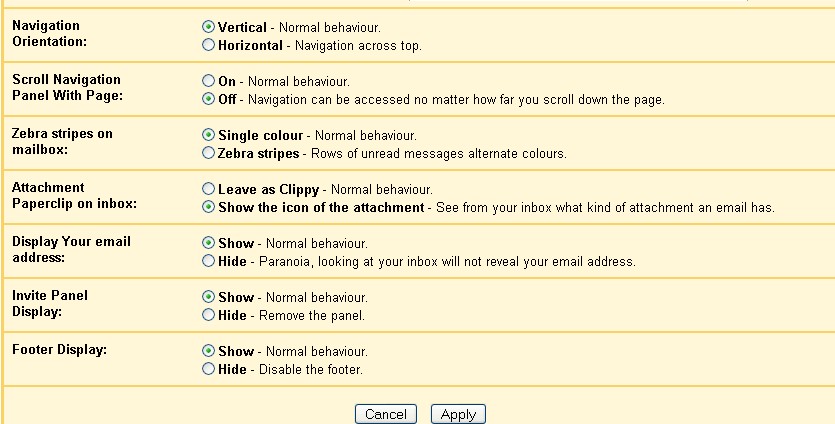
· Make the navigation (Inbox, Starred, Sent Mail, etc) horizontal

· Fix the navigation in place so that you don't have to scroll to the top of the page to see it

· Change the attachment paperclip (on inbox) to an icon indicating the type of attachment

· Hide various page elements (invite panel, page footer, your email address from the top right of inbox)
you can install it with your browser by simply clicking the followink link Gmail Skins

Friday, March 03, 2006

Whois Plugin for Firefox


Check out the new Active Whois plugin for firefox. It lets you get all Kinds of Whois Info - DNS record, Domain Owner and IP Address.

So whats different from the other whois tools existing for ages (I mean 3-4 years).

One , it is integrated within your browser

Two, it also installs a whois application on your system. So you can simpley check it by opening the application (without the browser)

Three, It keeps the record of the whois that you have already checked. I'm not sure how big the storage is, but I'm guessing enough to check all whois in a session.

Visit the link to download it Active Whois Plugin

Monday, February 27, 2006

Google's own Paintbrush


Check out this new tool by Google- “Google Page Creator”. It lets you create web pages and publish them in a single click (could it be that easy!!).

Its in testing phase though(like most google products :-) )

Find out more about the page creator on http://pages.google.com/-/about.html

It might just be the first brick laid towards “Google website Creator” eventually. Like 10 hz rightly asked “Is google taking over the world

Monday, January 16, 2006

Google Analytics - A Gift for Small and Medium online Businesses

Google has shaken up yet another industry and in the process given a great tool to Small and Medium online Businesses. The release of Google Analytics brings the power of web analytics to a whole new segment of online business and has the potential to reshape many websites out there in the near future. While high demand has forced Google to temporarily suspend new accounts on the service they have promised it will open to new users again soon.

Web analytics are essentially statistics that show who your visitors are and how they are using your website. Such information is as good as gold for an online marketer and no company large or small should be ignoring what visitors are doing on their websites.

While web analytics were once the domain of webmasters and Internet marketing gurus Google has opened web analytics to the masses with the release of Google Analytics.
In March 2005 Google bought Urchin, one of the most well known web analytics tools at the time. After months of industry speculation Google released a Google Analytics tool based on Urchin technology. The tool is free for Google adwords users and capped at five million page views a month for anyone with a Google account. We should never again hear that it’s too expensive or too difficult to track and consistently review web statistics.

So what can a small business do with all this new website data that is free for the taking? While there is a wealth of information collected by Google Analytics, below I’ll talk about the basics that most website owners can understand and easily use to improve their websites.

1. Where is your site traffic coming from?
Knowing where your website traffic is coming from is key in knowing if you are reaching the target audience you thought you were. All analytics programs including Google Analytics have information on the origin of your website traffic. Google Analytics will give you information on the country and city that your visitors are from and where on the Internet they are coming from, whether it is paid listings, certain keywords in search engines or other links.

With this information you can see if visitors to your site are from the geographic and internet regions that you target and if visitors are finding you through the keywords and Internet links you expect. I warn you before regularly checking on the origins of your traffic that the results may surprise you.

2. What was a visitor’s path on the site and how long did they stay?
Knowing how a visitor moves on your site is as good as opening up their mind to see how they think and react to your website. Most analytics programs including Google Analytics track information on entry pages to your site, the path visitors follow on the site, the exit page from the site and the length of time visitors stay on each page. With this information you can see where potential customers are being lost and if visitors are seeing the information they need to in order to convert them into customers.

For example, after analyzing your web analytics information you may realize that most of your site traffic from search engines is ending up at the articles section of the page without going through the homepage. If this were the case, your web analytics data is telling you to make sure that the articles section of your site includes prominent navigation to the rest of the site. It also suggests that your articles section may be a very good place to showcase special offers and strong calls to action.

3. What works on your web page?
Having accurate and detailed web statistics for your site allows you to do testing to see what can make your website work better and generate more revenue. Google Analytics shines here with an arsenal of comparison statistics for websites and Adwords campaigns. Google Analytics has features that allow you to do ad version testing and time series testing.

For example, if you have always had a gut feeling that your products would sell better if you changed your navigation layout you can try it for a month and judge by your web statistics which design worked better at keeping visitors on the site and converting them into customers.

Google Analytics provides a powerful free tool for small and medium on line businesses. While privacy of information is a concern, the power of Google Analytics as a free tool outweighs the potential privacy issues and as Google has pointed out, companies are already giving the same information to other analytics providers. So enjoy your new information but remember web analytics are addictive and you may find yourself checking your stats every night from now on.


With contributions from Nicholas